
500+ WordPress Sites Later: The Case for Moving On
We’ve built more than 500 WordPress sites. We currently host and maintain over 100 of them. WordPress paid our bills for nearly 20 years, and we got good at it, genuinely good, not the kind of good you get from installing a theme and calling it a day.
So when we tell you we’re moving away from WordPress, it’s a big deal, not an easy or overnight decision. We’re the people who spent that time inside WordPress, and we know exactly what it does well.
We’ve built 500+ WordPress sites over two full decades. Search and technology have both fundamentally changed since then but WordPress’s core architecture hasn’t. That’s why we now recommend most clients migrate to Next.js: real performance, security, and AI-visibility problems, backed by real data.
It’s Not One Number. It’s Everything At Once.
This isn’t a decision that came from a single report or a single metric. Search itself changed: how Google ranks pages, and how AI systems like ChatGPT and Perplexity decide what to cite instead of a competitor. Performance changed. Security changed. The limitations of building on themes and plugins instead of real code became a hard ceiling on what we could actually design and customize for a client. Every one of those shifted at roughly the same time, and WordPress’s architecture didn’t move with any of them. What follows is that full picture, not one report standing in for all of it.
Performance is the easiest piece to show concretely. Below is a real client’s WordPress site, exactly as we found it when they called, next to the default performance of the AI-native Next.js sites we build now: no extra work required to get there.
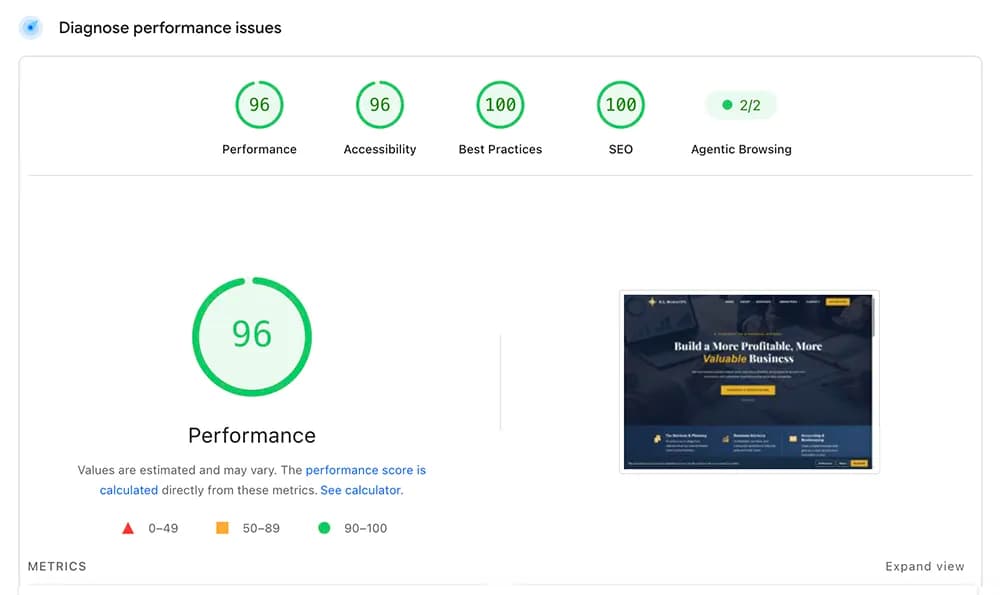
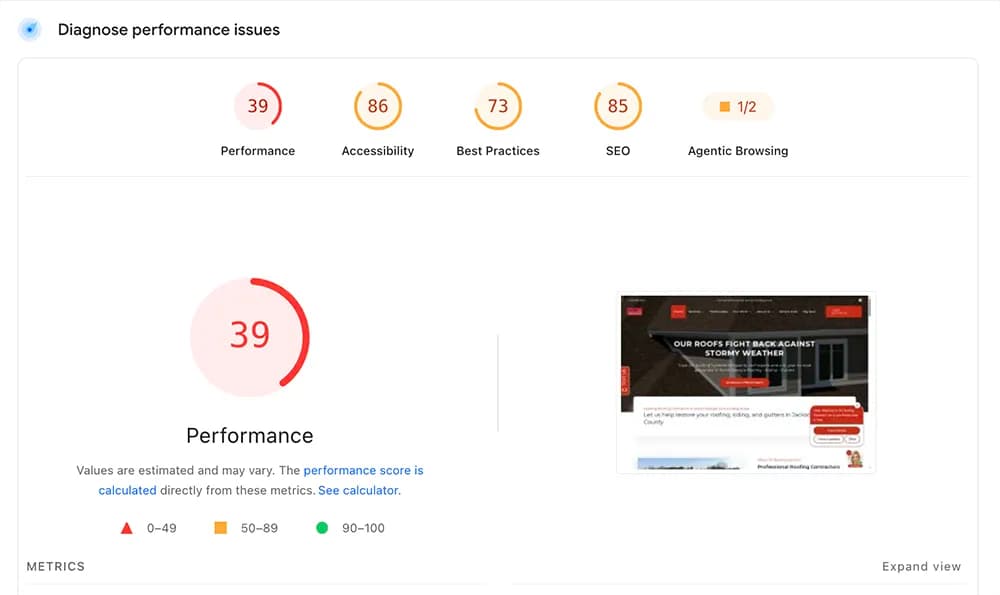
Drag to compare. Google PageSpeed Insights scores: 39 Performance / 86 Accessibility / 73 Best Practices / 85 SEO, before, vs. 96 / 96 / 100 / 100 after (cpaofgwinnett.com on the migrated stack).
Performance is just one piece. The rest of this post walks through the others: the security exposure, the AI crawlability problem, and the design and customization ceiling that comes with building on plugins instead of code.
The technical case, not just the vibes
“WordPress feels old” isn’t a reason to migrate a client’s revenue-generating website. So what changed?
Security: WordPress Has Real, Growing Vulnerabilities
WordPress now powers 41.2% of all websites and 59.1% of the entire CMS market (W3Techs). That scale is exactly why it’s the biggest target on the internet, and the plugins you install to make WordPress do modern things are the actual attack surface. The more of them you need (SEO plugin, caching plugin, image optimization plugin, schema plugin, security plugin, page builder), the bigger that surface gets.
Patchstack’s 2026 State of WordPress Security Report Backs That Up With Real Numbers
- 11,334 new vulnerabilities disclosed across the WordPress ecosystem in 2025, a 42% increase over 2024 (Patchstack)
- 113% year-on-year increase in highly exploitable vulnerabilities
- 91% of those vulnerabilities were in plugins, not WordPress core itself; only six core vulnerabilities were reported all year, and all were low risk
- 46% of last year’s vulnerabilities weren’t even patched by the time they were publicly disclosed
- 95.5% of the infections Sucuri’s team detected in its most recent full-year breakdown (2023) were on WordPress, a number that reflects WordPress’s dominant market share as much as anything else, but a real cost of that dominance is being the default target
We’re not describing this secondhand. We run monthly maintenance (updates, security scans, backups) on every one of the 100+ WordPress sites we host, a real process, run every month, without exception. In 2025, we still found and cleaned malware infections on three separate client sites. These weren’t neglected sites; we’d been actively patching them on schedule the entire time.
Keeping a WordPress site clean in today’s threat environment carries real cost even with disciplined monthly maintenance, because vulnerabilities are disclosed and exploited faster than any manual patch cycle can fully keep up with: 45% of exploited vulnerabilities hit within 24 hours of disclosure. That maintenance burden, and the risk that survives it, doesn’t exist in the same way on a static architecture with no plugin stack to patch.
Performance: The Plugin Tax on Page Speed
WordPress is capable of good performance. The catch is that on WordPress, performance is something you have to keep earning: every plugin in a typical stack adds its own JavaScript and its own database queries to every page load, often for functionality that isn’t even used on that page (your contact-form plugin’s script loading on your About page, your slider script loading on pages with no slider), and every update or new integration can quietly shift the number again. No amount of caching or minification changes that math permanently, it just buys back some of what the plugin stack costs.
Per the HTTP Archive’s 2025 Web Almanac, only 45% of WordPress sites pass Core Web Vitals on mobile, with page-load speed (LCP, a 53% pass rate on its own) behind most of the failures (HTTP Archive). That’s an industry-wide reflection of how much ongoing attention performance requires on WordPress, not a hard ceiling on any single site.
Next.js is architected around static generation instead. Pages are built to complete HTML ahead of time, with automatic image optimization(WebP/AVIF conversion, correctly-sized images per device, built-in layout-shift prevention) baked into the framework rather than bolted on as a plugin, so strong performance is closer to the starting point than something to actively defend. We don’t have a directly comparable, independently verified Next.js pass-rate figure to set against that 45% (HTTP Archive’s CMS data doesn’t break out frameworks), but the architectural difference behind the gap is real: complete HTML at build time versus a stack of plugins assembling the page at request time.
AI Crawlability: The New Failure Mode
This is the risk that didn’t exist three years ago and is now urgent. ChatGPT, Claude, and Perplexity’s crawlers don’t execute JavaScript. They read raw HTML only, and they fetch pages live, on a hard timeout, while a user is waiting for an answer.
One analysis, crediting research from Oncrawl’s Jérôme Salomon, found that on the sites it tracked, the overwhelming majority of HTTP 499 errors (server didn’t respond in time) came from ChatGPT-User, the bot that fetches pages in real time to answer a question, and it does not retry. Miss the window once and your page is simply excluded from the answer, with a competitor’s page picking up the citation instead.
A slow, plugin-bloated WordPress site is disproportionately exposed to this failure mode. Next.js’s static-generation model means the complete page already exists as plain HTML before any crawler, human or AI, ever asks for it: no rendering step, no timeout risk, no gap between request and readable content.
Accessibility: Getting Worse, Not Better
This one’s more nuanced than the others, worth being honest about. The 2026 WebAIM Million report found WordPress home pages average 52.8 accessibility errors, slightly better than the all-site benchmark of 56.1 (WebAIM). WordPress isn’t uniquely bad here, though it is getting worse faster than the web as a whole: errors up 10.4% year-on-year vs. 10.1% overall. A modern framework build gives us direct control over semantic markup instead of inheriting whatever a theme and a stack of page-builder plugins produced.
The trade-off hiding inside “affordable WordPress”
WordPress core, hand-coded by an experienced developer, can be fast, secure, and reasonably clean. Most small businesses don’t get that version, because it isn’t affordable at the budgets most local businesses have to work with.
What’s affordable is WordPress plus Elementor (or a comparable page builder) plus whatever plugin stack fills the functionality gaps, usually some version of the same short list:
- Forms
- SEO
- Caching
- Image optimization
- Security
- Backups
That combination is what makes WordPress cost effective in the first place, and it’s also exactly where every risk in this post concentrates. Elementor and page builders like it render pages by loading their own JavaScript and CSS framework on top of WordPress’s, which is a direct contributor to the plugin-stack bloat behind that 45% Core Web Vitals pass rate above. Every plugin bolted on to close a functionality gap adds to Patchstack’s 91%-of-vulnerabilities-are-in-plugins number, plus one more thing that has to stay updated, compatible with the next WordPress core release, and compatible with every other plugin in the stack.
We used to manage exactly this trade-off for every client, all day: bloat, performance, functionality, security, and ongoing compatibility, balanced against each other forever, because the moment you stop actively managing that balance, one of those variables slips. A static, code-based build doesn’t remove the need for good judgment about what a site needs. It removes the entire category of risk that comes from stacking third-party plugins to get there.
What we mean by “AI-native” design
Here’s the plain version. When someone asks ChatGPT, Perplexity, or Google’s AI Overview for a recommendation, an algorithm decides in real time whether your site is worth citing. Get skipped, and a competitor’s site answers the question instead, with your business nowhere in it. “AI-native” is our term for building a site that gives itself the best possible shot at being the one that gets cited, and on Next.js, the framework we use instead of WordPress, most of what that requires comes standard.
Three things matter most. Schema markup, structured data that tells an AI system exactly what your business is, what it does, and what services it offers, ships as code built directly into the site instead of depending on a plugin. llms.txt, a real, official standard, sits at your domain root and gives AI systems a map of what’s on the site and where the best content lives. And every page has to respond in under a second, because AI crawlers work on a live-answer clock: a user is waiting, so a slow page just gets skipped, not queued.
WordPress can approximate parts of this now too, to be fair. An SEO plugin like AIOSEO can add schema, a dedicated plugin can generate an llms.txt file. The difference is architectural, not aspirational: on Next.js these are native to how the site is built, on WordPress they’re one more plugin that needs updating, needs to stay compatible with everything else installed, and adds one more thing that can break. “AI-native” cuts both ways: because Next.js is real code, not a theme with a plugin bolted on, we can also wire in things a WordPress plugin ecosystem was never designed for, pulling live industry research directly into a page, connecting to a client’s own APIs, building content and functionality that’s specific to that business instead of assembled from whatever a plugin happens to offer.
This isn’t us chasing the next shiny thing
WordPress still makes sense for some businesses, content-heavy sites with a large non-technical editorial team leaning on its mature editing workflow, for instance. This also isn’t the first challenger WordPress has had: Squarespace, Wix, Webflow, and more recently Framer have all competed with it for the better part of a decade, some explicitly pitched as the modern alternative, and we never made a wholesale switch to any of them, not for our own site, not as a standing recommendation to clients.
What’s different this time isn’t the platform landscape, it’s what’s underneath the recommendation: how people find a business at all. Search is moving from links you click to answers an AI hands someone directly, and that shift rewards a different kind of website than WordPress’s page-builder-and-plugin model was ever built to produce, the same way mobile-responsive design went from optional to mandatory once actual customer behavior moved, not because a platform got trendy. That’s the scale of shift we’re responding to: the whole agency’s default changing, realigned around making sure what we build gets found, gets trusted by people and the AI systems now standing between them and a decision, and turns into real business for the people paying us to build it.
Frequently Asked Questions About Leaving WordPress
Is this actually about my site, or just a sales pitch wearing an article costume?
Fair question. We're not making this up to sell you something: 39 Performance and 86 Accessibility is a real client's WordPress site exactly as it looked when they came to us, their hosting, their plugins, before we touched anything. That's the starting point most WordPress clients bring us, not a cherry-picked worst case, and it's exactly why we run a dedicated technical/performance phase on every WordPress engagement before design or content even starts. If this were pure sales copy, we'd have skipped that part. What it turns into after that is a real offer: the same audit, run on your site, with your actual numbers, so you can see for yourself whether this applies to you.
If WordPress was always risky, why did you build/sell it to me?
It wasn't always this risky, not at this scale. WordPress now runs 41.2% of the web, which is exactly what makes it the biggest target on the internet, and the vulnerability count in its plugin ecosystem grew 42% in a single year (2025 over 2024). The AI-crawlability risk didn't exist as a business problem three years ago at all, it's a consequence of how people search now, not something we should have predicted when we built your site. We're telling you now because the picture has genuinely changed, not because we're trying to walk back past work.
What happens if I do nothing?
For most businesses, nothing happens today, and that's exactly the problem. Most WordPress sites never get meaningfully updated after launch: plugins go months or years without a patch, and almost none of them are ever scanned for vulnerabilities or the kind of hidden malware that quietly drags down performance without anyone noticing. Doing nothing isn't neutral, it's a slow slide. Search itself is what makes that slide expensive. It used to be ten blue links and a user picking one; now AI answers hand people a single recommendation, and that recommendation goes to sites built to perform, structurally, not ones limping along on whatever plugin stack accumulated over the years.
What does this actually cost me?
We're not going to hand you a full price sheet here, because it genuinely depends on your site's size and what's already on it. What we will say plainly: the cost isn't dramatically different from WordPress for the same size and scope. A site that would've run around $5,000 on WordPress is still around $5,000 built on Next.js, we're not charging a premium just because the stack changed. What's different is what that price now includes: near-instant load times, built-in functionality that supports getting cited by AI systems (schema markup, llms.txt), and a framework that isn't boxed in by whatever a theme or a stack of plugins happens to support.
What do I do right now, today?
Reply to this, or book a short call. We'll run the same audit on your site, the one described above, and tell you plainly whether a migration makes sense for your business. That's the one ask in this whole post.
So, what are we doing about it?
We’re not walking away from WordPress overnight. We still build it for partner agencies on their spec, and we still host and actively manage WordPress sites across a broad range of industries, on the same monthly maintenance discipline described above.
What’s changed is the default recommendation. We’re reaching out to every client we host or manage for a real conversation: what your business needs, your risk tolerance, your timeline, and whether a migration makes sense for you specifically, case by case, not as a blanket policy. Every client deserves to hear this case made with their own site’s numbers, instead of finding out the hard way.
Key Takeaways
- We’ve built 500+ WordPress sites over 20 years and still host and maintain over 100 of them, this isn’t an outside take.
- A real client’s WordPress site, as we found it, scored 39 Performance and 86 Accessibility; even after our dedicated performance phase, it still can’t match what the new stack hits by default, which is what sent us back through every client site we’d built.
- WordPress had 11,334 new vulnerabilities disclosed in 2025 (up 42% year-on-year), and 91% of them were in plugins, not WordPress core itself.
- Only 45% of WordPress sites pass Core Web Vitals on mobile, and AI crawlers like ChatGPT-User don’t execute JavaScript and don’t retry a slow page.
- We’ve watched other platforms challenge WordPress for a decade and never made a wholesale switch; this move is a response to how search itself is changing, not a trend.
- This isn’t a blanket “leave WordPress” verdict. Some clients will stay put, and we’ll keep maintaining those sites with the same monthly discipline we always have.
What we’d tell you to do next
If you’re one of our hosted clients, expect to hear from us directly. We’d rather have this conversation proactively than wait for an incident to force it.
If you’re not yet a client and you’re wondering where your own site stands, ask for the audit walked through above: real performance, accessibility, and security numbers, not guesses. We’ll tell you plainly whether a migration makes sense for your business. Not a sales pitch, the same numbers-first process that produced this post. Get in touch and we’ll show you exactly where you stand.